

Introducing Cozi Meal Planner
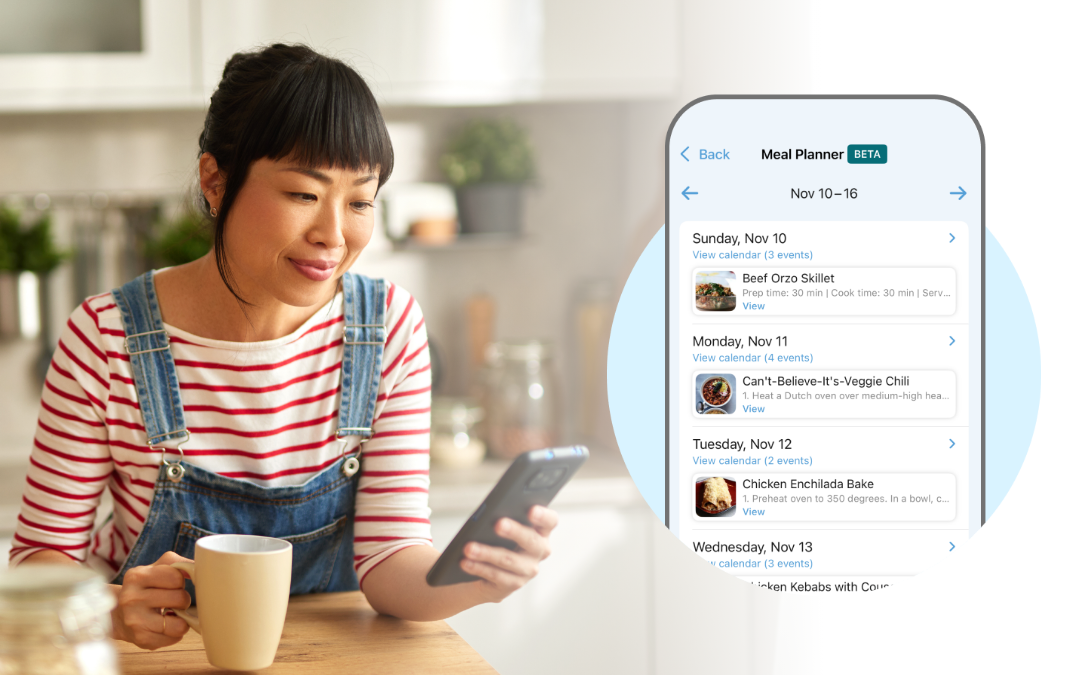
“What’s for dinner?”
Cue a low-key panic moment. You’re too busy to remember dinner exists, let alone plan for it.
But you can make it easier. Imagine if you already had a plan, and you had the ingredients, and your kids (and partner) didn’t even have to ask you. And yet it felt like less work all around.
Introducing the Cozi Meal Planner: an easy-to-use dinner planning app that helps you quickly create a dinner plan for the week ahead. A dinner plan you can stick to, without feeling overwhelmed. That’s one of our special features: The meal planner is connected to the Calendar, where you already keep your family’s schedules.
Whether you’re planning simple weeknight meals or getting ready for hosting weekend guests, Cozi helps you turn “what’s for dinner?” into “what’s next after chopping the carrots?”
How to get started with Cozi Meal Planner
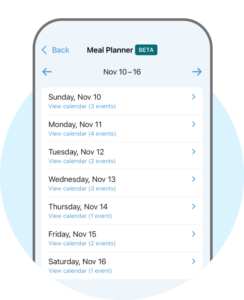
Find the Meal Planner by tapping Recipes and selecting Meal Planner Beta. Begin by viewing the week you’d like to plan for. You’ll see that Cozi’s already done the work of tracking your busy days for you!
Under each date, the number of events in your Cozi Calendar is displayed. With a quick tap on this blue text, remind yourself what’s coming up. Soccer practice till 7PM? Might want to throw something like our Tex-Mex Slow Cooker Chicken in the crockpot in the morning!
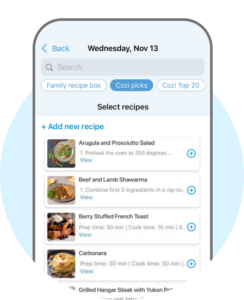
Select the day you want to plan dinner, and you’ll see a few options for entering your meal in the Cozi Meal Planner:
- Choose from Cozi Picks, a library of recipes we’ve collected from our Cozi families.
- Select a recipe from Cozi Top 20, a new list of popular dinner recipes.
- Add a new recipe, either from scratch or by pasting in a URL from your favorite cooking site.
- Choose a recipe from your Family Recipe Box
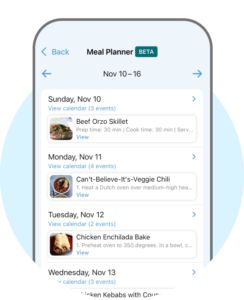
Once you’ve selected your meal, the recipe will automatically show up in your weekly view. You can continue to add dinners in the Meal Planner for as many days as you’d like. (Meal planning is currently limited to dinners only.)
How does Cozi Meal Planner work with the rest of Cozi?
The dinners you schedule in Cozi Meal Planner will also show up in your Cozi Calendar. Whether you’re in Agenda, 3-day (Cozi Gold feature) or Month View (Cozi Gold feature), tap on the Meal, then tap View Recipe to bring up the recipe.
You can integrate the recipe ingredients with your Cozi Shopping Lists by tapping the Shopping Cart icon at the top of your screen. Then, choose to add it to an existing Groceries list or create a new shopping list.
How can you put the Cozi Meal Planner to work for your family?
Plan your meals around your busy schedule
If you plan meals that don’t work around your schedule, you won’t make them. Or you will, and you’ll be completely exhausted. So when you enter Cozi’s family meal planning calendar, your weekly view will also display how many events you have on each day that week.
If you have hockey practice, a baseball game, and an event at the library on Tuesday after school, maybe don’t make Shepherd’s Pie. Save it for Friday when all you have is a doctor appointment in the morning.
Quickly pick dinners for the week
Adding a recipe to the Calendar is one tap away in the Meal Planner. Just browse your recipe box, or any of the Cozi recipe sections. With a quick tap on the + button, your chosen recipe will be featured on the Calendar.
Never hear the question “What’s for dinner?” again
Once a meal is added to your calendar, any family member on your Cozi account can see what’s for dinner directly from the Agenda emails, any Calendar view, or the Meal Planner. Next time you hear that annoying question, you’ll have an easy answer without scrambling. Or you can just say, “Check Cozi!” (and never answer it again).
Cozi’s meal planning app for the family makes meal planning a little less daunting and a little more fun. We’re in it together to reduce that last-minute dinner panic. For questions, support, or to give us feedback, drop us a line at [email protected].
Happy (meal) planning!
Happy (meal) planning!
 Cozi is the must-have family organizer app for busy families - easy to use and free in the app store. You'll wonder how you managed your busy life before Cozi. Get the Cozi family organizer app today!
| The #1 organizing app for families. FREE app and website to manage the family calendar, lists, and to dos – all in one place. |  |
| Get the best of Cozi with an ad-free experience and all the premium features. "Worth every penny." --Charlene M. |
 |