

Simplify Your Day: How to Create a Daily Schedule Using Cozi

As a parent, you probably try to keep some semblance of a normal schedule amidst the chaos of modern life. Having a daily schedule helps. It’s psychologically healthy and helps you stay on track with less decision fatigue.
Reducing decision fatigue is a huge part of Cozi. (Decision fatigue means feeling exhausted because you have to make so many choices every day, or even every hour!)
If you have your shopping list written, your chores list set up, and your dinner planned around the soccer game, then you don’t have to invest time into pondering whether you need raisins or whether you should mop or mow today. You can just follow along, focusing on the matters at hand because now you can give them your full attention.
Here’s a how-to guide for keeping your family’s schedule organized, coordinated, & shareable using Cozi.
The Benefits of Creating a Daily Schedule
Having a dedicated schedule planned out as a family creates structure, clarity, and a stronger sense of teamwork in daily life. When everyone knows what to expect, it reduces last-minute stress, missed commitments, and miscommunication.
A shared family schedule helps balance work, school, activities, and downtime more effectively, ensuring that responsibilities are fairly distributed and important moments aren’t overlooked. It also encourages accountability and independence, especially for children, while making it easier to prioritize quality time together.
Ultimately, if you plan your days as a family, you’ll be better organized, have smoother routines, and enjoy a more connected household.
How to create a daily schedule in Cozi
With Cozi, you can add a complete daily routine for each member of the family.
- Add a new event, such as math homework, and schedule it for a block of time during the afternoon.
- Add one or more family members to the event. There are two advantages to adding individual family members to events. The family member color code will show up on the event for easy, at-a-glance viewing. And that family member will get any reminders for the event.
- If this is part of a daily routine and you’d like it to repeat each weekday, select the Repeats option and choose Every Week On Monday, Tuesday, Wednesday, Thursday, and Friday. Other repeating options are also available. You can create a separate recurring schedule for the weekend.
- To remind the attendees of when a new event on the schedule begins, add a reminder to the event. With Cozi Gold, you have options ranging from 0 or 5 minutes all the way to 2 or 3 days, and you can set multiple reminders.
Now when math homework time is approaching, Liam will get a reminder 10 minutes before he needs to take a video game break. And you don’t have to play the bad guy, peeling him away from his digital adventures. He knows the daily schedule, and it feels normal.
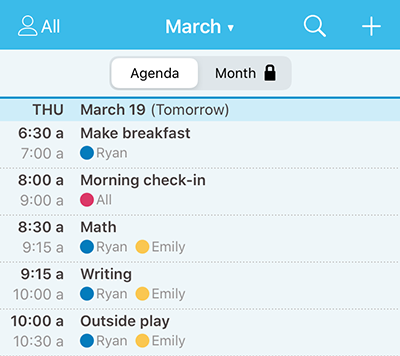
- Or tap “3-day” view to see everything laid out in a timeline, where you can scroll up and down to get a sense of how your day is balanced. If you need to call your health insurance but your afternoon is slammed, call them in the morning.
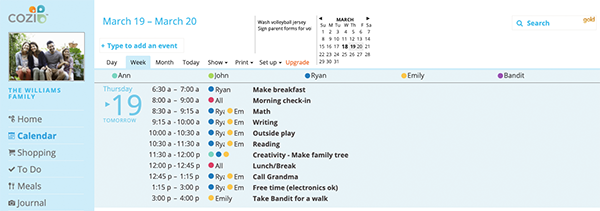
- You can also access your daily schedule using Cozi on the web, by signing in at my.cozi.com. The web version of Cozi has a Week view that is similar to the mobile app’s Agenda view, as well as Month view and Day view.
How to share the daily schedule with other family members in Cozi
- Have them sign in to Cozi: Anyone in the family can access the daily schedule using the Cozi mobile app or Cozi on the web. Individual family members sign in with the email address listed for them in Settings and the shared family password.
- Send Daily Agenda Emails: If you’d like to send the schedule by email, turn on Daily Agenda Emails for other family members, and an email will automatically arrive each morning with the day’s schedule.
- Print the schedule and post it: To print the schedule, visit Cozi on the web, navigate to your Calendar, and select Print from the top menu. Choosing to print This Week will provide an agenda-type view for each day.
Pro Tip! You can also print the schedule for just one person. To do this, visit Cozi on the web, navigate to your Calendar, select the person’s name in the Show tab, then select Print from the top menu.
Want an empty printable calendar of the day to hand write your schedule? Visit our printable calendar page. Or, download Cozi for free to get started with the app today!
 Cozi is the must-have family organizer app for busy families - easy to use and free in the app store. You'll wonder how you managed your busy life before Cozi. Get the Cozi family organizer app today!
| The #1 organizing app for families. FREE app and website to manage the family calendar, lists, and to dos – all in one place. |  |
| Get the best of Cozi with an ad-free experience and all the premium features. "Worth every penny." --Charlene M. |
 |